
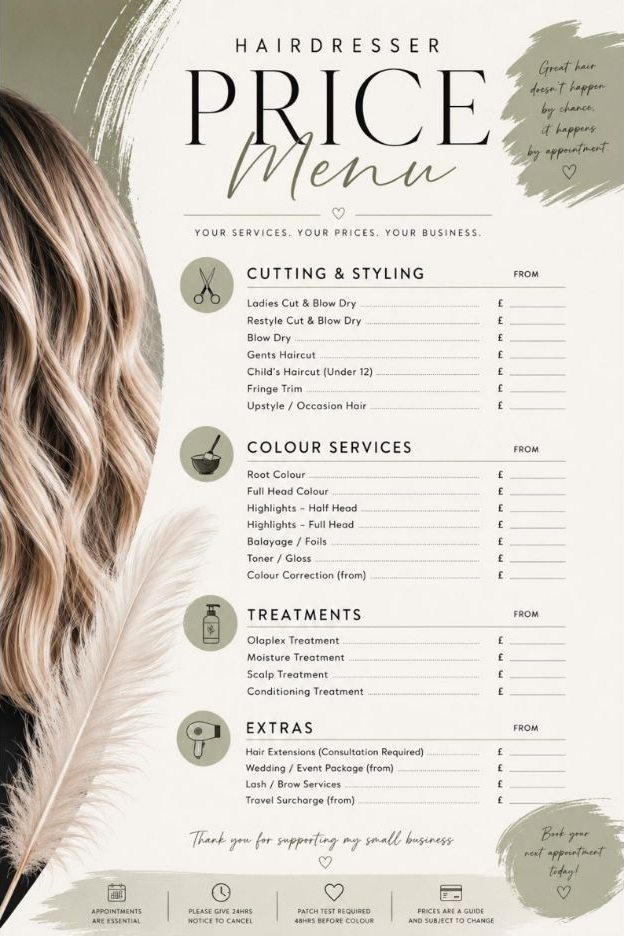
A hairdresser price list should answer questions before a client needs to send a message. What services do you offer? What is included? What might change the final cost? How does travel work? A clear menu makes booking easier for the client and saves you from typing the same explanations every week.
The best price lists are not necessarily the longest or most decorative. They are organised, specific and easy to keep up to date.
Begin with the services you genuinely want to sell
Do not copy every line from another salon’s menu. Start with your own booking history and group the services that make sense for your business. A practical structure might include:
- Cutting & Styling
- Colour Services
- Treatments
- Occasion Hair
- Gents and Children, if offered
- Extras, travel or call-out charges
If a service is rarely booked, unprofitable or no longer suits the direction of the business, leaving it off the new menu may be the right decision.
Use names clients recognise
Industry language can create confusion. Use a clear client-facing name first, then add a short explanation where needed. “Full-head highlights” is more useful than an unexplained abbreviation. “Cut and finish” should state whether a consultation, shampoo and blow-dry are included.
Keep descriptions short. The menu is there to help somebody choose a service, while a consultation can deal with the detail.
Be honest about fixed prices and ‘from’ prices
A fixed price works well when the time and product cost are predictable. A “from” price may be more appropriate when length, density, previous colour or the complexity of the work can change the appointment significantly.
If you use “from”, explain the reason and say when the client will receive a firm quote. For example: “Colour prices shown are starting prices. Your exact quote will be confirmed following consultation and may vary with hair length, density, product use and colour history.”


This is clearer and more trustworthy than showing a low headline price that almost nobody pays.
Include the policies that affect price
The menu does not need to carry your complete terms and conditions, but it should signpost anything that could change the amount a client pays. Depending on your business, that may include:
- A consultation or patch-test requirement before selected colour services
- Deposit and cancellation arrangements
- Travel included within a stated area and charges beyond it
- Minimum booking values for mobile visits
- Extra product or time charges for very long or dense hair
- The date from which a new price list applies
Keep your full booking policy somewhere easy to access and make sure the wording on your menu, website, booking system and social profiles agrees.
Design for scanning, not studying
Most clients will glance at a menu on a phone. Use generous spacing, a readable type size and strong headings. Align service names and prices consistently. Avoid squeezing too many decorative elements around the information or using a script font for every line.
A restrained colour palette and one or two font styles usually look more professional than a busy design. Test the finished menu on a mobile screen and print a copy before sharing it widely.
Give every version one source of truth
Keep one master file. When prices change, update that file first, export a new PDF and replace every public version on the same day. Check your website, pinned social posts, booking platform, highlights, printed copies and saved replies.
Add a version date in small print. It helps you spot an old copy and prevents uncertainty if a client has saved a previous menu.
Final price-list checklist
- Every listed service is current and profitable
- Headings and service names make sense to clients
- Fixed and starting prices are used consistently
- Possible extras are explained before booking
- Travel, deposits and consultation requirements are signposted
- The design is readable on a phone and on paper
- All old copies have been replaced
A clear menu does not remove the need for consultation. It gives that conversation a professional starting point—and gives clients the confidence to enquire.